0
1
2
3
4
5
6
7
8
9
0
1
2
3
4
5
6
7
8
9
0
1
2
3
4
5
6
7
8
9
0
1
2
3
4
5
6
7
8
9
0
1
2
3
4
5
6
7
8
9
0
1
2
3
4
5
6
7
8
9
0
1
2
3
4
5
6
7
8
9
0
1
2
3
4
5
6
7
8
9
0
1
2
3
4
5
6
7
8
9
0
1
2
3
4
5
6
7
8
9
0
1
2
3
4
5
6
7
8
9
0
1
2
3
4
5
6
7
8
9
/
0
1
2
3
4
5
6
7
8
9
0
1
2
3
4
5
6
7
8
9
/
0
1
2
3
4
5
6
7
8
9
0
1
2
3
4
5
6
7
8
9
ANNO·​VICESIMO·​SEXTO·​DIE·​TRECENTESIMO·​QVADRAGESIMO·​OCTAVO·​VITÆ·​POVYA
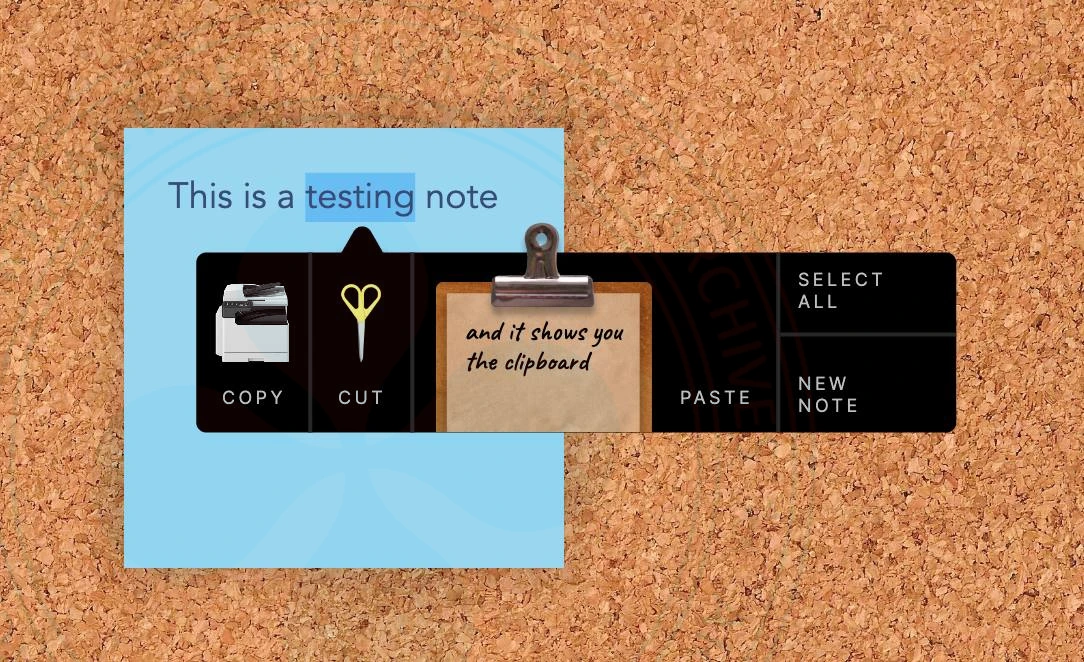
A creative, dark-themed context menu floats over a light blue digital note, which is pinned to a textured corkboard background. The menu is a sleek black horizontal bar with rounded corners and a small triangular pointer on the top edge indicating the selected text.
The menu is divided into four functional segments:
Copy: On the far left, a realistic miniature white office photocopier icon sits above the word “COPY” in a clean, white, uppercase sans-serif font.

Cut: Next to it, a pair of standing golden scissors icon is paired with the word “CUT.”

Clipboard/Paste: The central and largest section features a skeuomorphic wooden clipboard with a metallic silver clip. The clipboard holds a piece of tan paper with the handwritten cursive message: “and it shows you the clipboard.” The word “PASTE” is positioned to the immediate right of this graphic.

Utility Actions: The far right of the bar contains a vertical stack of two text-based options separated by a thin line: “SELECT ALL” on top and “NEW NOTE” at the bottom.

The design creates a high-contrast look by mixing a modern, flat black interface with highly detailed, realistic icons, transforming abstract digital commands into tactile, real-world objects.

The implementation of the context menu for Corkboard .